
Query Matcher
The Query matcher allows a rule to match requests based on URL query parameters. It is the primary way to create behavior that depends on search terms, filters, feature flags, UTM tracking codes, or any other data passed in the query string.
The Query matcher only determines whether a rule should run. Once a request matches, the rule’s configured handlers execute.
To learn how rules work, see Hostgrid Rules.
How the Query matcher works
Section titled “How the Query matcher works”The Query matcher evaluates the query string portion of the incoming request URL (everything after the ?).
For the URL:
https://example.com/products?category=shoes&color=blueThe components are:
| Component | Value |
|---|---|
| Host | example.com |
| Path | /products |
| Query | category=shoes&color=blue |
Only the specified query parameter is evaluated by this matcher. The host, path, headers, and HTTP method are matched using their own matcher types.
You configure the matcher by providing the parameter name (the key) and the condition its value must satisfy.
Supported operators
Section titled “Supported operators”The Query matcher supports the following comparison operators.
| Operator | Description | Example |
|---|---|---|
| is equal to | Matches an exact parameter value. | shoes matches only ?category=shoes. |
| is not equal to | Matches every value except the specified one. | shoes matches ?category=electronics, ?category=books, etc. |
| begins with | Matches values that start with the specified text. | app matches ?search=apple, ?search=application, etc. |
| ends with | Matches values that end with the specified text. | .json matches ?format=.json. |
| contains | Matches values containing the specified text. | phone matches ?q=smartphone, ?q=phones, etc. |
| does not contain | Matches values that do not contain the specified text. | admin matches any query value that does not include admin. |
| unknown | Always matches. | Useful when the query parameter itself should not affect matching. |
These operators perform string comparisons against the decoded query parameter value. Choose the operator that most closely matches the requests you want the rule to affect.
Matching examples
Section titled “Matching examples”Match a specific parameter value
Section titled “Match a specific parameter value”To match requests where the category is exactly “electronics”:
Parameter: categoryOperator: is equal toValue: electronics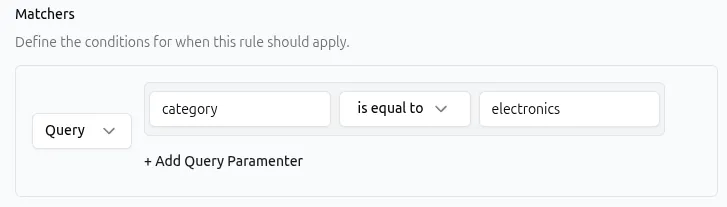
API representation:
{ "type": "query", "params": { "items": [ { "name": "category", "operator": "equal", "value": "electronics" } ] }}Match partial values in search queries
Section titled “Match partial values in search queries”To match any search query containing the word “phone”:
Parameter: qOperator: containsValue: phone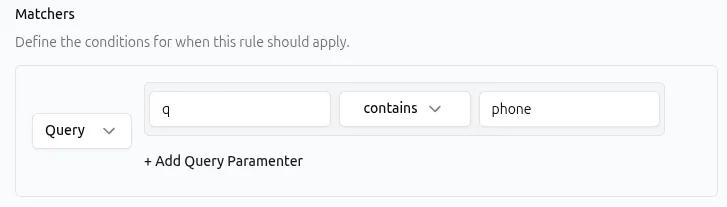
API representation:
{ "type": "query", "params": { "items": [ { "name": "q", "operator": "contains", "value": "phone" } ] }}This matches ?q=smartphone, ?q=phones, and ?q=phone-case.
Exclude a specific mode
Section titled “Exclude a specific mode”To match requests where the mode parameter is anything other than “admin”:
Parameter: modeOperator: is not equal toValue: admin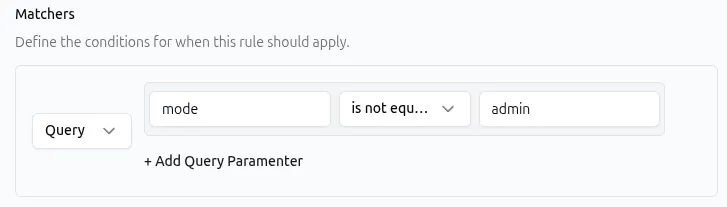
API representation:
{ "type": "query", "params": { "items": [ { "name": "mode", "operator": "not_equal", "value": "admin" } ] }}This matches ?mode=user, ?mode=guest, and requests that have no mode parameter at all.
Matching multiple query parameters in a single matcher
Section titled “Matching multiple query parameters in a single matcher”A single Query matcher can include conditions for more than one query parameter.
When multiple parameter conditions are added to the same matcher, all of them must match before the rule executes.
For example, a single Query matcher with these conditions:
category is equal to electronicsbrand is equal to acmeOnly matches requests that satisfy both conditions, such as ?category=electronics&brand=acme.
This behaves identically to adding two separate Query matchers to the same rule. Use whichever approach keeps your rule configuration clearer.
Combining the Query matcher with other matchers
Section titled “Combining the Query matcher with other matchers”A rule can contain matchers of different types. When multiple matchers are configured, all of them must match before the rule executes.
| Matcher combination | What it matches |
|---|---|
Query lang=es + Path /dashboard | Only requests to /dashboard that include ?lang=es |
Query format=json + Method POST | Only POST requests that include ?format=json |
Query token=abc + Header X-Secret: true | Only requests with that specific query parameter and header |
Similarly, you can combine the Query matcher with:
Common use cases
Section titled “Common use cases”The Query matcher is most effective when paired with a handler that takes a different action based on the query parameters in the request.
| Use case | Query matcher | Handler |
|---|---|---|
| Enable a feature flag for testing | feature: is equal to new-ui | Rewrite to forward the request to a new upstream path. See Rewrite Handler. |
| Track or modify marketing campaign traffic | utm_source: begins with newsletter | Response Headers to add tracking headers for analytics. See Response Headers Handler. |
| Localize content based on a language parameter | lang: is equal to es | Redirect to the Spanish version of the site. See Redirect Handler. |
| Add debugging headers for specific users | debug: is equal to true | Request Headers to pass a debug flag to the upstream. See Request Headers Handler. |
| Block unauthorized preview access | preview_token: does not contain v1 | Static Response returning a 403 error. See Static Response Handler. |
Best practices
Section titled “Best practices”- Be aware of URL encoding. Query parameter values are often URL-encoded (e.g., spaces appear as
%20or+). The matcher evaluates the decoded value, so you should use the unencoded string in your configuration (e.g., usered shoes, notred%20shoes). - Parameter names and values are case-sensitive.
?Category=Shoesdoes not match a matcher looking forcategoryequal toshoes. - Use
containsfor flexible matching. If a parameter can have multiple valid formats or variations,containsis more resilient than exact matching. - Consider parameter order. The order of query parameters in a URL does not matter.
?a=1&b=2is treated the same as?b=2&a=1. - Be cautious with sensitive data. Query parameters are visible in URLs, browser history, and server logs. Avoid routing or handling sensitive tokens exclusively via query matchers when possible.
Troubleshooting
Section titled “Troubleshooting”If a rule with a Query matcher is not matching as expected:
- Check parameter name spelling. Verify the exact key used in the URL (e.g.,
utm_sourcevsUTM_Sourcevsutm-source). - Inspect the actual query string. Use browser developer tools (Network tab) to see the exact parameter names and values being sent.
- Review URL encoding. If your match fails on values with spaces or special characters, ensure you are comparing against the decoded value.
- Review operator selection.
is not equal to adminmatches requests with?mode=user, but it also matches requests that have nomodeparameter at all. - Confirm matcher combinations. If the rule has multiple matchers, every one must evaluate to true. A Path matcher that does not match will prevent the rule from running even if the Query matcher does.
- Consider rule order. If an earlier rule contains a Redirect or Static Response handler, later rules will not execute for that request.
For more information about rule evaluation, see Hostgrid Rules.