
Method Matcher
The Method matcher allows a rule to match requests based on the HTTP method. It is the primary way to differentiate between read operations (GET), write operations (POST, PUT, PATCH), and deletion operations (DELETE) without inspecting the request body or URL.
The Method matcher only determines whether a rule should run. Once a request matches, the rule’s configured handlers execute.
To learn how rules work, see Hostgrid Rules.
How the Method matcher works
Section titled “How the Method matcher works”The Method matcher evaluates the HTTP method of the incoming request.
For the request:
POST https://example.com/api/users HTTP/1.1The components are:
| Component | Value |
|---|---|
| Method | POST |
| Host | example.com |
| Path | /api/users |
| Headers | (varies) |
Only the method is evaluated by this matcher.
The path, headers, and query parameters are matched using their own matcher types.
Supported HTTP methods
Section titled “Supported HTTP methods”The Method matcher recognizes standard HTTP methods:
| Method | Typical use |
|---|---|
GET | Retrieve a resource |
POST | Create a resource or submit data |
PUT | Replace a resource entirely |
PATCH | Partially update a resource |
DELETE | Remove a resource |
Supported operators
Section titled “Supported operators”The Method matcher supports the following comparison operators.
| Operator | Description | Example |
|---|---|---|
| is equal to | Matches an exact HTTP method. | POST matches only POST requests. |
| is not equal to | Matches every method except the specified one. | POST matches GET, PUT, PATCH and DELETE |
Unlike the Path matcher, the Method matcher does not support prefix, suffix, or substring operators. HTTP methods are discrete values, so exact comparison is sufficient.
Matching examples
Section titled “Matching examples”Match only POST requests
Section titled “Match only POST requests”To match only POST requests, such as form submissions or API creates:
Operator: is equal toValue: POST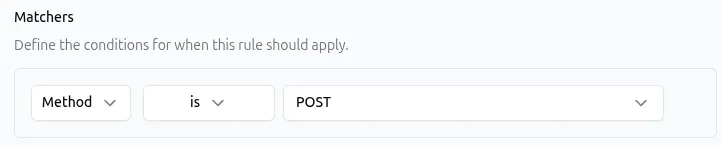
API representation:
{ "type": "method", "params": { "operator": "is", "value": "POST" }}Exclude DELETE requests
Section titled “Exclude DELETE requests”To match any request except DELETE:
Operator: is not equal toValue: DELETE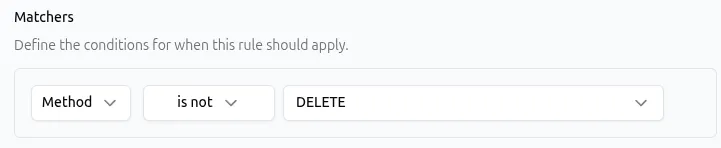
API representation:
{ "type": "method", "params": { "operator": "is_not", "value": "DELETE" }}Combining the Method matcher with other matchers
Section titled “Combining the Method matcher with other matchers”A rule can contain multiple matchers. When multiple matchers are configured, all of them must match before the rule executes.
This makes the Method matcher most useful when combined with other matchers to target specific operations on specific resources.
| Matcher combination | What it matches |
|---|---|
Method POST + Path /api/users | Only POST requests to /api/users |
Method DELETE + Header X-Admin: true | Only DELETE requests that include an admin header |
Method GET + Query draft=true | Only GET requests with draft=true in the query string |
Similarly, you can combine the Method matcher with:
Common use cases
Section titled “Common use cases”The Method matcher is most effective when paired with a handler that takes a different action depending on the type of request.
| Use case | Method matcher | Handler |
|---|---|---|
| Block destructive operations on a public API | is equal to DELETE | Static Response returning a 403 or 405 error. See Static Response Handler. |
| Add authentication headers to write requests | is not equal to GET | Request Headers to inject an auth token for non-read operations. See Request Headers Handler. |
| Redirect POST form submissions to a new endpoint | is equal to POST | Redirect to the updated form processing URL. See Redirect Handler. |
| Enforce read-only mode during maintenance | is not equal to GET | Static Response returning a “read-only mode” message for any non-GET request. See Static Response Handler. |
| Log or flag all write operations via headers | is equal to POST | Request Headers to add a debugging header before forwarding to the upstream. See Request Headers Handler. |
Best practices
Section titled “Best practices”- Use the Method matcher to separate read traffic from write traffic when they need different handling.
- Pair the Method matcher with the Path matcher to target specific API endpoints rather than applying method-based rules broadly.
- Remember that browsers typically use
GETfor page navigation andPOSTfor form submissions. API clients may usePUT,PATCH, andDELETEas well.
Troubleshooting
Section titled “Troubleshooting”If a rule with a Method matcher is not matching as expected:
- Check method casing. HTTP methods are case-sensitive in the matcher.
postdoes not matchPOST. - Verify the actual method. Use browser developer tools (Network tab) or server logs to confirm the method being sent. Some frameworks or proxies may convert methods (e.g.,
POSTwith_method=PUTin the body). - Review operator selection.
is not equal to POSTmatches every non-POST request, not just GET requests. - Check matcher combinations. If the rule has multiple matchers, confirm that every matcher evaluates to true. A Path matcher that does not match will prevent the rule from running even if the Method matcher does.
- Consider rule order. Hostgrid executes all matching rules in order. If an earlier rule contains a Redirect or Static Response handler, later rules will not execute for that request.
For more information about rule evaluation, see Hostgrid Rules.