
Rewrite Handler
The Rewrite handler allows a rule to modify the URL of an incoming request before forwarding it to the upstream.
Unlike the Redirect handler, which sends a new URL back to the client’s browser, the Rewrite handler changes the URL transparently. The user’s browser address bar continues to show the original URL, while your upstream receives the rewritten URL.
This is useful for migrating URL structures, integrating backend services, or implementing API versioning without changing the public-facing links.
To learn how handlers fit into rules, see Hostgrid Rules.
How the Rewrite handler works
Section titled “How the Rewrite handler works”When a rule containing a Rewrite handler matches a request, Hostgrid modifies the request URI based on the pattern you provide. The request is then forwarded to the upstream using the new URI.
Incoming Request: /dashboard │ ▼Rule Matches │ ▼Rewrite Handler Executes → URI changes to /internal/v2/dashboard │ ▼Forward Request to Upstream (using rewritten URI) │ ▼Response Returned to Client (Browser still shows /dashboard)Configuration options
Section titled “Configuration options”The Rewrite handler requires a single parameter:
| Option | Type | Required | Description |
|---|---|---|---|
uri | string | Yes | The new URI to forward to the upstream. Can include static text and placeholders. |
The uri value replaces the entire path and query string of the incoming request. If you want to preserve parts of the original URL, you must include placeholders in the uri value.
Rewrite placeholders
Section titled “Rewrite placeholders”You can use placeholders in the uri field to dynamically preserve parts of the original request URL.
| Placeholder | Description | Example |
|---|---|---|
{http.request.uri.path} | The path component of the URL. | For /blog/post?id=123, this returns /blog/post. |
{http.request.uri.path.dir} | The directory part of the path. | For /blog/post/123.html, this returns /blog/post. |
{http.request.uri.path.file} | The filename part of the path. | For /blog/post/123.html, this returns 123.html. |
{http.request.uri.query} | The query string without the ?. | For /blog/post?id=123&author=jane, this returns id=123&author=jane. |
Configuration examples
Section titled “Configuration examples”Add a version prefix to all requests
Section titled “Add a version prefix to all requests”To route all traffic under a specific path to a versioned backend directory:
URI: /v2{http.request.uri.path}?{http.request.uri.query}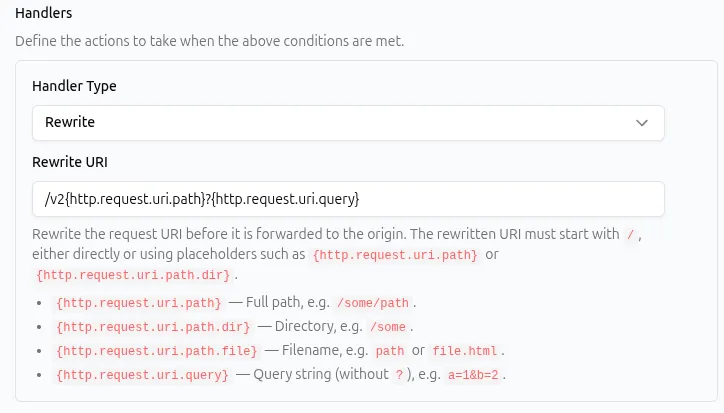
API representation:
{ "type": "rewrite", "params": { "uri": "/v2{http.request.uri.path}?{http.request.uri.query}" }}A request to /dashboard?user=1 is rewritten to /v2/dashboard?user=1 before reaching the upstream.
Strip a path segment
Section titled “Strip a path segment”To rewrite requests from an old /articles/ structure to a new /blog/ structure while keeping the filename:
URI: /blog/{http.request.uri.path.file}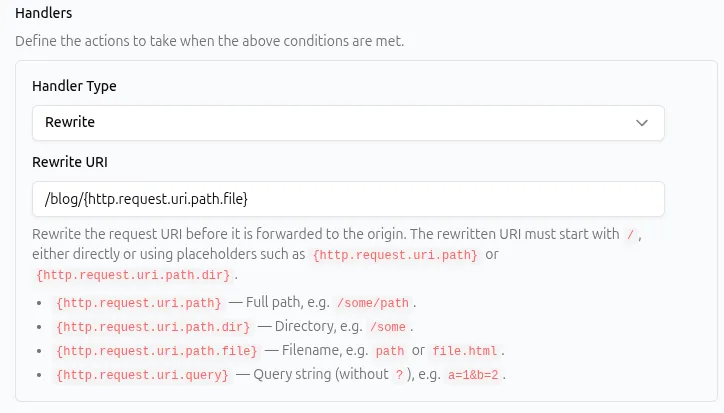
API representation:
{ "type": "rewrite", "params": { "uri": "/blog/{http.request.uri.path.file}" }}A request to /articles/2023-review.html is rewritten to /blog/2023-review.html.
Route a subpath to a different service
Section titled “Route a subpath to a different service”To forward requests made to /app to a completely different internal endpoint:
URI: /internal/services/frontend/index.htmlAPI representation:
{ "type": "rewrite", "params": { "uri": "/internal/services/frontend/index.html" }}Any request to /app (or any path matching the rule’s matcher) will be rewritten to this specific internal file.
Common use cases
Section titled “Common use cases”The Rewrite handler is typically paired with path matchers to intercept and alter requests before they reach the upstream.
| Use case | Matcher example | Rewrite configuration |
|---|---|---|
Migrate from /articles to /blog | Path begins with /articles/ | /blog/{http.request.uri.path.file}?{http.request.uri.query} |
| Implement API versioning | Path begins with /api/ | /api/v1{http.request.uri.path}?{http.request.uri.query} |
| Serve a single-page app from a subdirectory | Path begins with /app | /index.html |
| Mount a microservice at a clean URL | Path begins with /payments | /internal/payment-service{http.request.uri.path} |
Rewrite vs. Redirect
Section titled “Rewrite vs. Redirect”Choosing between Rewrite and Redirect depends on whether the URL should change in the user’s browser.
| Feature | Rewrite | Redirect |
|---|---|---|
| Browser URL | Stays the same | Changes to the new location |
| SEO impact | Search engines index the original URL | Search engines update their index to the new URL (if 301) |
| Upstream receives | The rewritten URL | A completely new request to the new URL |
| Use case | Internal routing, backend integration, app mounting | Content moved permanently, consolidating domains, fixing broken links |
Combining with other handlers
Section titled “Combining with other handlers”Because the Rewrite handler does not terminate the request, it can be combined safely with other handlers in the same rule.
- Request Headers: Add a header to identify that a request was rewritten before it reaches the upstream. See Request Headers Handler.
- Response Headers: Add headers to the response based on the fact that the request matched this rule. See Response Headers Handler.
Place the Rewrite handler before response-modifying handlers in your rule configuration.
Best practices
Section titled “Best practices”- Preserve query strings. If your upstream relies on query parameters, always append
?{http.request.uri.query}to your rewrite URI. If there is no query string, this evaluates to an empty string and causes no issues. - Do not rewrite to paths the upstream cannot handle. A rewrite does not change the upstream itself; it only changes the path sent to it. Ensure the target path exists on your upstream server.
- Use Redirects for SEO changes. If a page has permanently moved and you want search engines to update their indexes, use a 301 Redirect instead of a rewrite.
- Keep rewrites simple. Complex string manipulations are prone to errors. Use the most specific placeholder available (e.g., use
{http.request.uri.path.file}instead of{http.request.uri.path}if you only need the filename).
Troubleshooting
Section titled “Troubleshooting”If a rule with a Rewrite handler is not behaving as expected:
- Check upstream logs. The best way to debug a rewrite is to check the logs on your upstream server to see exactly what URL it received.
- Verify placeholder syntax. Placeholders must be wrapped in curly braces exactly as documented (e.g.,
{http.request.uri.path}). Typos or missing braces will be treated as literal static text. - Look for 404 errors from the upstream. If the client sees a 404, the rewrite likely executed successfully, but the newly generated path does not exist on your upstream server.
- Check for dropped query parameters. If your upstream is missing expected query parameters, ensure
?{http.request.uri.query}is included at the end of your rewrite URI. - Check handler order. If the rewrite is not happening, ensure no earlier handler in the rule (like a Redirect or Static Response handler) is terminating the request first.