
Static Response Handler
The Static Response handler allows a rule to return a custom HTTP response directly to the client. When this handler executes, the request is not forwarded to the upstream.
This is useful for serving maintenance pages, custom error responses, blocked request messages, or mocked API payloads without modifying your upstream application.
To learn how handlers fit into rules, see Hostgrid Rules.
How the Static Response handler works
Section titled “How the Static Response handler works”When a rule containing a Static Response handler matches a request, Hostgrid immediately stops processing the request.
The response is generated and returned to the client using the status code and body you provide. The request never reaches your upstream server.
Incoming Request │ ▼Rule Matches │ ▼Static Response Handler Executes → Returns Response to Client │ ✕ (Request stops here) ✕ (No further handlers execute) ✕ (No upstream forwarding)Configuration options
Section titled “Configuration options”The Static Response handler requires two parameters:
| Option | Type | Required | Description |
|---|---|---|---|
status_code | integer | Yes | The HTTP status code to return (e.g., 200, 404, 503). |
body | string | Yes | The content to return in the response body (HTML, JSON, text). |
Setting the Content-Type header
Section titled “Setting the Content-Type header”By default, responses are returned with a default Content-Type. If you need to serve JSON (application/json) or a specific HTML charset, you must pair the Static Response handler with the Response Headers handler in the same rule.
Place the Response Headers handler before the Static Response handler in your rule configuration to ensure the header is applied to the response.
Configuration examples
Section titled “Configuration examples”Return a custom 404 error page
Section titled “Return a custom 404 error page”To return a branded 404 page when a specific path is not found:
Status Code: 404Body: <!DOCTYPE html><html><body><h1>Page Not Found</h1><p>The page you're looking for doesn't exist.</p></body></html>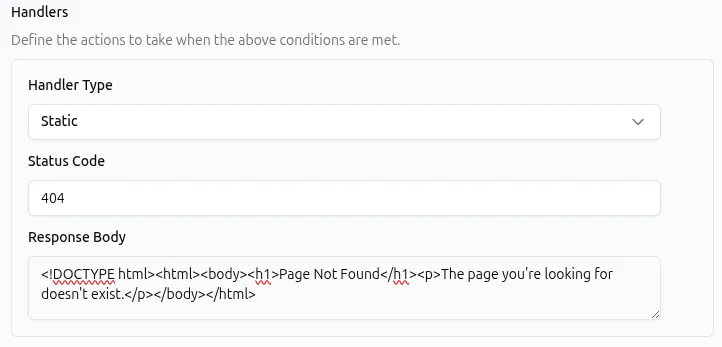
API representation:
{ "type": "static_response", "params": { "status_code": 404, "body": "<!DOCTYPE html><html><body><h1>Page Not Found</h1><p>The page you're looking for doesn't exist.</p></body></html>" }}Return a JSON API response
Section titled “Return a JSON API response”To return a static JSON payload (for example, mocking an endpoint or returning a status object), pair it with a Response Headers handler to set Content-Type to application/json.
Status Code: 200Body: {"status": "ok", "version": "1.0.0"}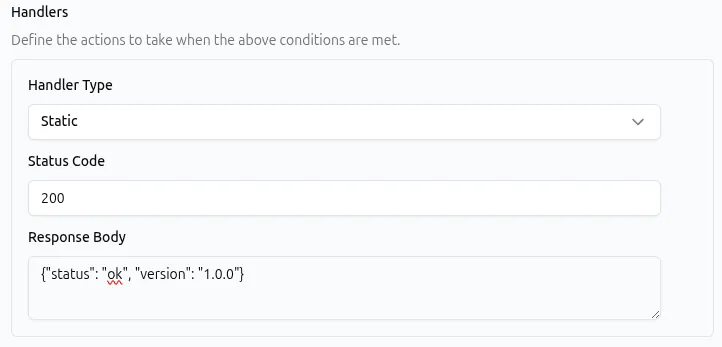
API representation for the complete rule:
{ "name": "API Status Endpoint", "is_active": true, "matchers": [ { "type": "path", "params": { "operator": "equal", "value": "/api/status" } } ], "handlers": [ { "type": "response_headers", "params": { "operations": [ { "name": "Content-Type", "value": "application/json", "action": "set" } ] } }, { "type": "static_response", "params": { "status_code": 200, "body": "{\"status\": \"ok\", \"version\": \"1.0.0\"}" } } ]}Return a 503 maintenance page
Section titled “Return a 503 maintenance page”To take a site offline for maintenance, you can create a rule with match all paths that returns a 503 status.
Status Code: 503Body: <!DOCTYPE html><html><body><h1>Under Maintenance</h1><p>We will be back shortly.</p></body></html>API representation:
{ "type": "static_response", "params": { "status_code": 503, "body": "<!DOCTYPE html><html><body><h1>Under Maintenance</h1><p>We will be back shortly.</p></body></html>" }}Common use cases
Section titled “Common use cases”The Static Response handler is typically paired with specific matchers to intercept requests before they reach the upstream.
| Use case | Matcher example | Static Response configuration |
|---|---|---|
| Display a maintenance page | matches all requests | 503 status with HTML body |
| Serve a custom 404 page | Path is equal to a specific route | 404 status with HTML body |
| Block unauthenticated API access | Header Authorization is not equal to token | 401 status with JSON error body |
| Mock an API endpoint for testing | Path is equal to /api/mock | 200 status with JSON body (requires Content-Type) |
| Block bot traffic | Header User-Agent contains bad-bot | 403 status with plain text body |
Limitations
Section titled “Limitations”- Maximum body size: The response body is limited to 10,000 characters. For larger responses, serve the content from your upstream or a CDN.
- Text-based content only: The body must be a string. Binary data (such as images or PDFs) is not supported.
- No server-side rendering: The body is returned exactly as configured. It cannot execute server-side logic, inject dynamic variables, or process templates at the time of the request.
Best practices
Section titled “Best practices”- Use appropriate HTTP status codes. Use
200for successful static content,4xxfor client errors (like unauthorized access or missing pages), and5xxfor server-side states (like maintenance mode). - Keep responses lightweight. Since the body is limited to 10k characters and served directly from the edge, keep HTML and JSON payloads as small as possible.
- Set the Content-Type header. Always pair with the Response Headers handler if returning JSON or specific XML to ensure the client parses it correctly.
- Disable instead of delete. If you are using a Static Response for temporary situations (like maintenance mode), disable the rule rather than deleting it so it can be quickly re-enabled later.
- Use the Redirect handler for redirects. Do not combine Static Response with a
Locationheader to create redirects. Use the dedicated Redirect handler which handles this natively.
Troubleshooting
Section titled “Troubleshooting”If a rule with a Static Response handler is not behaving as expected:
- Check handler order. If the response is not being returned, ensure the Static Response handler is the last handler in the rule and that no earlier handler is terminating the request.
- Check rule order. If another rule above this one matches the request and contains a Redirect or Static Response handler, this rule will never execute.
- Verify Content-Type. If a JSON response is rendering as raw text in the browser, ensure you have a Response Headers handler configured to set
Content-Typetoapplication/jsonbefore the Static Response handler. - Validate body formatting. Ensure JSON bodies are valid and properly escaped in the API payload (e.g., using
\"for internal quotes). - Check body length. If the response is being truncated or failing, verify that the body does not exceed the 10,000 character limit.