
Response Headers Handler
The Response Headers handler allows a rule to add, modify, or remove HTTP headers in the response returned by the upstream, before Hostgrid sends it to the client.
This is useful for injecting security headers (like X-Frame-Options), configuring caching behavior (like Cache-Control), or stripping headers that expose internal server information (like X-Powered-By) without modifying your upstream application.
To learn how handlers fit into rules, see Hostgrid Rules.
How the Response Headers handler works
Section titled “How the Response Headers handler works”When a rule containing a Response Headers handler matches a request, Hostgrid forwards the request to the upstream as usual. Once the upstream generates a response, Hostgrid intercepts it, applies your header operations, and then sends the modified response to the client.
Incoming Request │ ▼Rule Matches → Request Forwarded to Upstream │ ▼Upstream Returns Response │ ▼Response Headers Handler Executes → Modifies Response Headers │ ▼Modified Response Sent to ClientConfiguration options
Section titled “Configuration options”The Response Headers handler accepts an array of operations. Each operation defines a single action to perform on a response header.
| Option | Type | Required | Description |
|---|---|---|---|
action | string | Yes | The operation to perform. Must be set (add or modify) or delete (remove). |
name | string | Yes | The HTTP header name (e.g., Cache-Control, X-Custom-Header). |
value | string | Conditional | The value to set. Required if action is set. Ignored if action is delete. |
Understanding set vs delete
Section titled “Understanding set vs delete”set: If the header does not exist in the upstream response, it is added. If the header already exists, its value is replaced by the new value.delete: Removes the header from the upstream response entirely. If the header does not exist, the operation does nothing.
Configuration examples
Section titled “Configuration examples”Add a security header
Section titled “Add a security header”To add an X-Frame-Options header to prevent your site from being embedded in iframes:
Action: setName: X-Frame-OptionsValue: DENY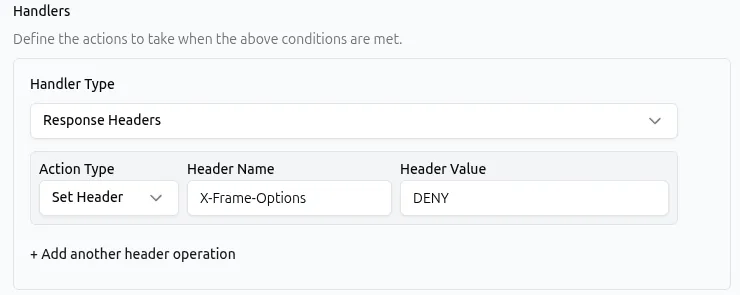
API representation:
{ "type": "response_headers", "params": { "operations": [ { "action": "set", "name": "X-Frame-Options", "value": "DENY" } ] }}Remove a server fingerprinting header
Section titled “Remove a server fingerprinting header”To strip the X-Powered-By header often added by frameworks like Express or PHP:
Action: deleteName: X-Powered-By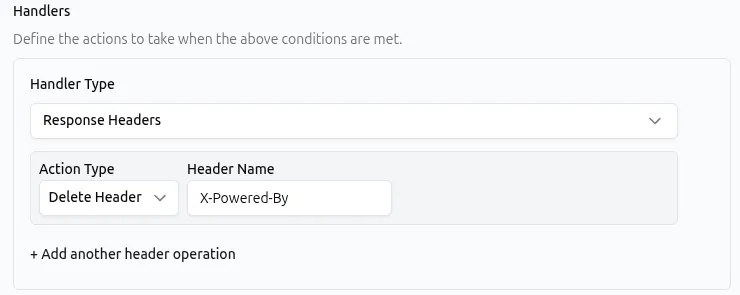
API representation:
{ "type": "response_headers", "params": { "operations": [ { "action": "delete", "name": "X-Powered-By" } ] }}Perform multiple operations in one handler
Section titled “Perform multiple operations in one handler”A single Response Headers handler can contain multiple operations. They are executed in the order they appear.
For example, setting a cache control header and removing the Server header simultaneously:
API representation:
{ "type": "response_headers", "params": { "operations": [ { "action": "set", "name": "Cache-Control", "value": "max-age=3600" }, { "action": "delete", "name": "Server" } ] }}Common use cases
Section titled “Common use cases”The Response Headers handler is typically applied globally via upstream rules or to specific routes via domain rules.
| Use case | Matcher example | Response Headers configuration |
|---|---|---|
| Enforce security policies | Match all requests | set X-Content-Type-Options to nosniff |
| Control browser caching for assets | Path begins with /static/ | set Cache-Control to public, max-age=31536000 |
| Enable Cross-Origin Resource Sharing | Header Origin: has a value | set Access-Control-Allow-Origin to https://example.com |
| Hide upstream technology stack | Match all requests | delete X-Powered-By, delete Server |
| Set Content-Type for static responses | Path is equal to /api/health | set Content-Type to application/json (used with Static Response) |
Combining with other handlers
Section titled “Combining with other handlers”Because the Response Headers handler modifies the response on the way out, it pairs naturally with other handlers.
- Static Response: When returning a static JSON or XML response, the default
Content-Typemight betext/html. Place a Response Headers handler before the Static Response handler in your rule to set the correctContent-Type. - Request Headers: You can use a Request Headers handler to add a header to the upstream in the same rule, and a Response Headers handler to modify the header coming back from the upstream.
Best practices
Section titled “Best practices”- Do not modify Hop-by-Hop headers. Headers like
Transfer-Encoding,Content-Length,Connection, andKeep-Alivemanage the connection between Hostgrid and the client. Modifying or deleting these can break the response. - Use
setto override upstream values. If your upstream setsCache-Control: no-cachebut you want to cache a specific asset, usingsetwill safely overwrite the upstream’s value. - Group related operations. Instead of creating multiple rules to set three different security headers, use a single Response Headers handler with three
setoperations. - Apply global headers at the Upstream level. If a header (like a security header) should apply to all domains connected to an upstream, configure the rule on the upstream rather than duplicating it across individual domain rules.
Troubleshooting
Section titled “Troubleshooting”If a rule with a Response Headers handler is not behaving as expected:
- Check handler order for Static Responses. If you are trying to set a
Content-Typefor a Static Response, the Response Headers handler must be placed above the Static Response handler in the rule configuration. If it is placed below, it will not execute because the Static Response handler terminates the request. - Verify header name spelling. Use standard casing (e.g.,
X-Frame-Options, notx-frame-options). While HTTP headers are technically case-insensitive, using standard casing prevents confusion. - Check for rule conflicts. If you have two rules modifying the same header, the rule positioned later in the execution order will win.
- Inspect the actual upstream response. Use browser developer tools (Network tab) or
curl -Ito see if the upstream is setting the header with a different casing or format than expected. - Avoid modifying
Content-Length. If you add or remove headers, Hostgrid manages the necessary framing. Manually settingContent-Lengthvia this handler can cause the client to truncate the response or time out.