
How Prepend Path Works
Prepend Path allows you to automatically add a path prefix to every request before it is forwarded to your upstream.
This is useful when multiple websites or applications share the same upstream but are served from different routes. Instead of creating separate upstreams, each custom domain can forward requests to a different path within the same application.
For example, a request to:
customer.com/aboutcan be forwarded to:
app.example.com/customers/acme/aboutThe visitor continues browsing customer.com, while your upstream receives the request with the additional path.
How Prepend Path works
Section titled “How Prepend Path works”By default, Hostgrid forwards requests to the upstream without changing the request path.
customer.com/about │ ▼app.example.com/aboutWhen a Prepend Path is configured, Hostgrid inserts the configured prefix before forwarding the request.
For example:
- Upstream:
app.example.com - Custom Domain:
customer.com - Prepend Path:
/customers/acme
A request to:
https://customer.com/aboutis forwarded to:
https://app.example.com/customers/acme/aboutThe browser URL remains unchanged. Only the request sent to your upstream is modified.
Request flow
Section titled “Request flow”Prepend Path is applied as part of Hostgrid’s normal request routing.
Incoming Request │ ▼customer.com/about │ ▼Hostgrid │ ▼Prepend "/customers/acme" │ ▼app.example.com/customers/acme/aboutThe request is then forwarded to your upstream, which processes it normally.
Configuring a Prepend Path
Section titled “Configuring a Prepend Path”When creating or editing a custom domain, you’ll find the Prepend Path field in the domain configuration, under Advanced Settings.
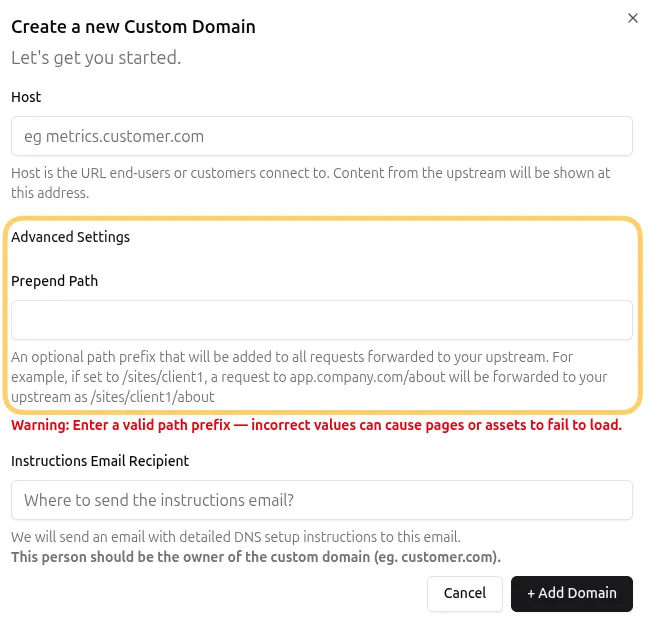
Enter the path you want Hostgrid to prepend to every request.
Examples:
/dashboard/sites/client1/customers/acme/v2The path should begin with /.
Once the domain has been verified and activated, Hostgrid automatically applies the configured path prefix to every incoming request.
Common use cases
Section titled “Common use cases”Multi-tenant applications
Section titled “Multi-tenant applications”Many SaaS applications organize customer data under unique paths.
Example:
Upstreamapp.example.com
customer-a.comPrepend Path: /sites/customer-a
customer-b.comPrepend Path: /sites/customer-b
Requests become:
customer-a.com/products→ app.example.com/sites/customer-a/products
customer-b.com/products→ app.example.com/sites/customer-b/products
This allows multiple customer domains to share the same application while serving different content.
Website builders
Section titled “Website builders”Website builders often store customer websites under separate directories.
Example:
app.builder.com/sites/client1app.builder.com/sites/client2app.builder.com/sites/client3Each custom domain can automatically route to the appropriate directory without requiring multiple upstreams.
Bubble applications
Section titled “Bubble applications”Bubble applications frequently host multiple projects, client portals, or landing pages within a single application.
Using Prepend Path allows each custom domain to route to a different section of the same Bubble application.
Examples include:
- Client-specific portals
- Marketing microsites
- White-labeled applications
- Separate customer dashboards
Development and staging
Section titled “Development and staging”Prepend Path can also separate different versions of an application.
Example:
staging.company.comPrepend Path: /v2A request to:
staging.company.com/loginis forwarded to:
app.example.com/v2/loginThis allows production and staging environments to share the same upstream.
Example architecture
Section titled “Example architecture” Upstream app.example.com │ ┌──────────────────┼──────────────────┐ │ │ │ ▼ ▼ ▼ customer-a.com customer-b.com staging.company.com │ │ │ ▼ ▼ ▼ /sites/a /sites/b /v2 │ │ │ └──────────────────┴──────────────────┘ │ ▼ Forwarded to upstreamEach domain points to the same upstream while using a different path prefix.
Best practices
Section titled “Best practices”- Use descriptive and consistent path prefixes.
- Match your path structure to your application’s routing.
- Avoid changing path prefixes after a domain is live unless your upstream has also been updated.
- Verify that your upstream serves content from the configured path.
- Keep customer or application directories organized using predictable naming conventions.
Things to know
Section titled “Things to know”- Prepend Path modifies the request sent to your upstream.
- It does not change the URL shown in the visitor’s browser.
- Every custom domain can have its own Prepend Path.
- Multiple domains can point to the same upstream while using different path prefixes.
- Hostgrid does not modify your upstream application or its content—it only forwards requests to the configured path.