
Path Matcher
The Path matcher allows a rule to match requests based on the URL path. It is one of the most commonly used matchers because it lets you target specific pages, sections of a website, API endpoints, or file types.
The Path matcher only determines whether a rule should run. Once a request matches, the rule’s configured handlers execute.
To learn how rules work, see Hostgrid Rules.
How the Path matcher works
Section titled “How the Path matcher works”The Path matcher evaluates the path component of the incoming request URL.
For the URL:
https://example.com/blog/articles?id=123The components are:
| Component | Value |
|---|---|
| Host | example.com |
| Path | /blog/articles |
| Query | id=123 |
Only the path is evaluated.
Query parameters, headers, and HTTP methods are matched using their own matcher types.
Supported operators
Section titled “Supported operators”The Path matcher supports the following comparison operators.
| Operator | Description | Example |
|---|---|---|
| is equal to | Matches an exact path. | /contact matches only /contact. |
| is not equal to | Matches every path except the specified one. | /contact matches every path except /contact. |
| begins with | Matches paths that start with the specified value. | /blog matches /blog, /blog/articles, /blog/latest etc. |
| ends with | Matches paths that end with the specified value. | .pdf matches /files/report.pdf. |
| contains | Matches paths containing the specified text. | product matches /products, /category/product-list etc. |
| does not contain | Matches paths that do not contain the specified text. | admin matches every path except those containing admin. |
| unknown | Always matches. | Useful when the path itself should not affect rule matching. |
Matching examples
Section titled “Matching examples”Match a specific page
Section titled “Match a specific page”To match only the contact page:
Operator: is equal toValue: /contact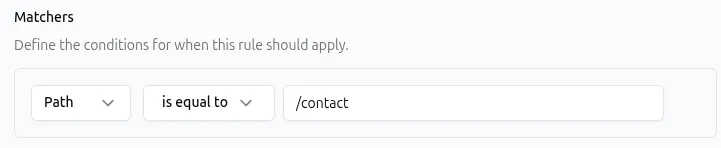
API representation:
{ "type": "path", "params": { "operator": "equal", "value": "/contact" }}Match an entire section
Section titled “Match an entire section”To match every request under /blog:
Operator: begins withValue: /blogMatches:
/blog/blog/articles/blog/2026/welcome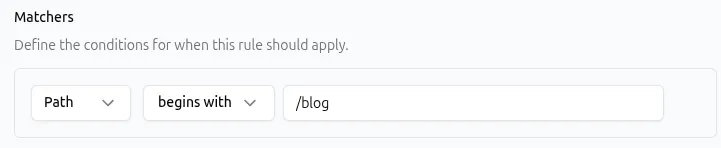
API representation:
{ "type": "path", "params": { "operator": "begins_with", "value": "/blog" }}Match PDF files
Section titled “Match PDF files”To match every PDF request:
Operator: ends withValue: .pdfMatches:
/files/report.pdf/docs/manual.pdf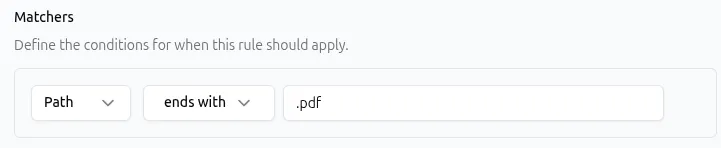
API representation:
{ "type": "path", "params": { "operator": "ends_with", "value": ".pdf" }}Exclude an admin section
Section titled “Exclude an admin section”To match every request except those containing admin:
Operator: does not containValue: admin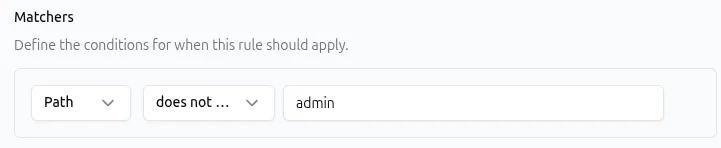
API representation:
{ "type": "path", "params": { "operator": "not_contains", "value": "admin" }}Combining the Path matcher with other matchers
Section titled “Combining the Path matcher with other matchers”A rule can contain multiple matchers.
When multiple matchers are configured, all of them must match before the rule executes.
For example:
| Matcher | Value |
|---|---|
| Path | begins with /api/ |
| Method | POST |
This rule matches only POST requests made to paths beginning with /api/.
Similarly, you can combine the Path matcher with:
Common use cases
Section titled “Common use cases”The Path matcher can be combined with different handlers to create routing and response behavior for specific parts of your application.
| Use case | Path matcher | Handler |
|---|---|---|
| Redirect old documentation URLs | begins with /docs | Redirect → /help. See Redirect Handler. |
| Rewrite requests before they reach the upstream | begins with /blog | Rewrite to the desired upstream path. See Rewrite Handler. |
| Serve a maintenance page | is equal to /maintenance | Static Response to return a maintenance page without forwarding the request. See Static Response Handler. |
| Add request headers for API endpoints | begins with /api | Request Headers to add, modify, or remove headers sent to the upstream. See Request Headers Handler. |
| Add response headers to specific pages or sections | begins with /app | Response Headers to modify headers returned to the client. See Response Headers Handler. |
| Match requests for specific file types | ends with .pdf | Use any compatible handler, such as Redirect, Static Response, or Response Headers, depending on the desired behavior. |
Path matching behavior
Section titled “Path matching behavior”The Path matcher performs straightforward string comparisons using the selected operator.
For example:
- begins with behaves like matching everything under a prefix.
- ends with is useful for matching file extensions.
- contains matches text anywhere within the path.
Choose the operator that most closely matches the requests you want the rule to affect.
Best practices
Section titled “Best practices”- Use is equal to when matching a single page.
- Use begins with when matching an entire section of a site.
- Keep path values as specific as possible to avoid unintended matches.
- Remember that path matching is case-sensitive.
- Test similar paths (such as
/blogand/blog/) if your application treats them differently. - Remember that Hostgrid executes all matching rules in order unless a handler returns a response immediately.
Troubleshooting
Section titled “Troubleshooting”If a rule is not matching as expected:
- Verify that the path is spelled correctly.
- Check that the selected operator matches your intended behavior.
- Ensure the path includes a leading
/where appropriate. - Confirm the request is reaching the expected domain.
- If the rule includes multiple matchers, verify that every matcher evaluates to true.
For more information about rule evaluation, see Hostgrid Rules.