
Redirect Handler
The Redirect handler allows a rule to send an HTTP redirect response to the client. Unlike the Rewrite handler, which modifies the URL behind the scenes, the Redirect handler changes the URL visibly in the user’s browser.
This is useful for site migrations, URL restructuring, or pointing users to updated content.
To learn how handlers fit into rules, see Hostgrid Rules.
How the Redirect handler works
Section titled “How the Redirect handler works”When a rule containing a Redirect handler matches a request, Hostgrid immediately stops processing the request and returns a redirect response with the specified status code and target URL. The client’s browser then makes a new request to that location.
The request never reaches your upstream server.
Incoming Request │ ▼Rule Matches │ ▼Redirect Handler Executes → Returns Redirect Response to Client │ ✕ (Request stops here) ✕ (No further handlers execute) ✕ (No upstream forwarding)Configuration options
Section titled “Configuration options”The Redirect handler requires two parameters:
| Option | Type | Required | Description |
|---|---|---|---|
location | string | Yes | The target URL (must include http:// or https://). |
status_code | integer | Yes | The HTTP status code for the redirect. Must be 301 (permanent) or 302 (temporary). |
Choosing a status code
Section titled “Choosing a status code”- 301 (Permanent): Tells search engines and browsers that the URL has moved permanently. Search engines will update their indexes to the new URL, and browsers will cache the redirect.
- 302 (Temporary): Tells search engines and browsers that the URL has moved temporarily. Search engines will keep the original URL in their indexes.
Redirect placeholders
Section titled “Redirect placeholders”You can use placeholders in the location field to dynamically preserve parts of the original request URL. This is useful when redirecting entire directories or domains without mapping every individual URL.
| Placeholder | Description | Example |
|---|---|---|
{http.request.uri.path} | The path component of the URL. | For /blog/post?id=123, this returns /blog/post. |
{http.request.uri.path.dir} | The directory part of the path. | For /blog/post/123.html, this returns /blog/post. |
{http.request.uri.path.file} | The filename part of the path. | For /blog/post/123.html, this returns 123.html. |
{http.request.uri.query} | The query string without the ?. | For /blog/post?id=123&author=jane, this returns id=123&author=jane. |
Configuration examples
Section titled “Configuration examples”Simple permanent redirect
Section titled “Simple permanent redirect”To permanently redirect a specific page to a new URL:
Status Code: 301Location: https://example.com/new-page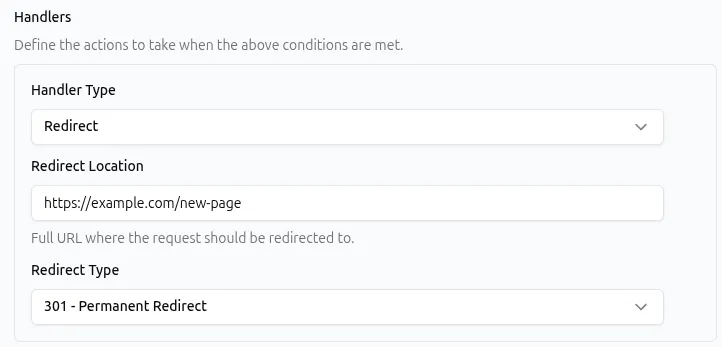
API representation:
{ "type": "redirect", "params": { "location": "https://example.com/new-page", "status_code": 301 }}Domain migration preserving path and query
Section titled “Domain migration preserving path and query”To redirect an entire domain to a new one while keeping the exact path and query parameters intact:
Status Code: 301Location: https://new-domain.com{http.request.uri.path}?{http.request.uri.query}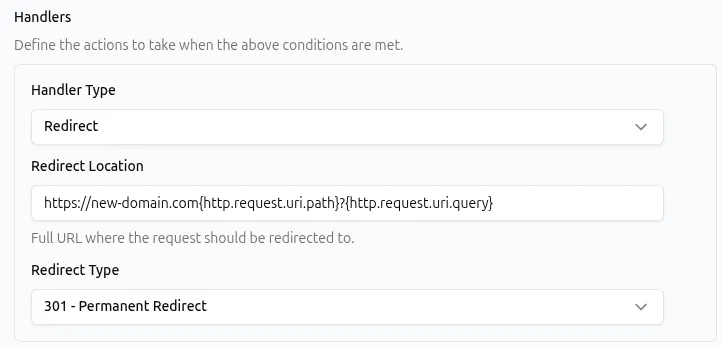
API representation:
{ "type": "redirect", "params": { "location": "https://new-domain.com{http.request.uri.path}?{http.request.uri.query}", "status_code": 301 }}A request to https://old-domain.com/products/item42?utm_source=abc will redirect to https://new-domain.com/products/item42?utm_source=abc.
Temporary redirect for maintenance
Section titled “Temporary redirect for maintenance”To temporarily redirect users away from a specific section during maintenance:
Status Code: 302Location: https://status.example.com/maintenanceAPI representation:
{ "type": "redirect", "params": { "location": "https://status.example.com/maintenance", "status_code": 302 }}Common use cases
Section titled “Common use cases”The Redirect handler is typically paired with specific matchers to intercept requests before they reach the upstream.
| Use case | Matcher example | Redirect configuration |
|---|---|---|
| Migrate an old blog structure | Path begins with /blog/old | 301 to https://example.com/blog/new{http.request.uri.path.file} |
| Consolidate multiple domains | Matches all requests | 301 to https://primary-domain.com{http.request.uri.path} |
| Temporarily move a feature | Path is equal to /beta-dashboard | 302 to https://example.com/dashboard |
| Update a renamed product page | Path is equal to /products/widget-v1 | 301 to https://example.com/products/widget |
Best practices
Section titled “Best practices”- Use 301 for permanent changes. This preserves SEO value by transferring link equity to the new URL.
- Use 302 for temporary changes. This prevents search engines from indexing the temporary destination URL as the canonical page.
- Avoid redirect chains. Do not set up a redirect that points to another URL that also redirects. Chains increase latency and can cause search engines to stop following the redirects.
- Do not redirect HTTP to HTTPS. Hostgrid automatically enforces HTTPS for all active domains. Adding a redirect rule for this is unnecessary and can cause loops.
- Disable instead of delete. If using a 302 redirect for a temporary situation, disable the rule when the situation ends rather than deleting it, so it can be easily re-enabled if needed.
- Test with browser developer tools. Use the Network tab to verify the correct status code and
Locationheader are being returned.
Troubleshooting
Section titled “Troubleshooting”If a rule with a Redirect handler is not behaving as expected:
- Check the
locationformat. The target URL must be a fully qualified URL starting withhttp://orhttps://. Relative paths (like/new-page) are not supported. - Check for redirect loops. If a redirect points back to itself (or to another rule that redirects back to it), the browser will stop processing after a certain number of hops and display an error.
- Verify the status code. Ensure you are using
301or302. Other 3xx status codes are not supported by this handler. - Check handler order. If the redirect is not occurring, ensure no earlier handler in the rule (like a Static Response handler) is terminating the request first.
- Check rule order. If another rule above this one matches the request and contains a terminating handler, this redirect rule will never execute.