
Header Matcher
The Header matcher allows a rule to match requests based on HTTP request headers. It is the primary way to create behavior that depends on client information, authentication state, content type, or any other metadata carried in headers.
The Header matcher only determines whether a rule should run. Once a request matches, the rule’s configured handlers execute.
To learn how rules work, see Hostgrid Rules.
How the Header matcher works
Section titled “How the Header matcher works”The Header matcher evaluates the headers of the incoming request. You specify which header to inspect and what condition its value must satisfy.
For the request:
GET /dashboard HTTP/1.1Host: example.comAuthorization: Bearer token_abc123User-Agent: Mozilla/5.0 (iPhone; CPU iPhone OS 17_0 like Mac OS X)Accept-Language: en-USContent-Type: application/jsonThe components are:
| Component | Value |
|---|---|
| Method | GET |
| Host | example.com |
| Path | /dashboard |
| Headers | Authorization, User-Agent, etc. |
Only the specified header is evaluated by this matcher. The path, method, and query parameters are matched using their own matcher types.
Common headers to match
Section titled “Common headers to match”| Header | Typical use |
|---|---|
User-Agent | Browser or client identification |
Authorization | Authentication credentials |
Content-Type | Format of the request body |
Accept | Preferred response format |
Accept-Language | Preferred language |
Referer | Origin page of the request |
X-Forwarded-For | Client IP when behind a proxy |
Any standard or custom header can be matched.
Supported operators
Section titled “Supported operators”The Header matcher supports the following comparison operators.
| Operator | Description | Example |
|---|---|---|
| is equal to | Matches an exact header value. | application/json matches only application/json. |
| is not equal to | Matches every value except the specified one. | application/json matches every Content-Type except application/json. |
| begins with | Matches values that start with the specified text. | Bearer matches Bearer eyJhbGciOiJIUzI1NiIs.... |
| ends with | Matches values that end with the specified text. | gzip matches application/json; charset=utf-8; encoding=gzip. |
| contains | Matches values containing the specified text. | iPhone matches Mozilla/5.0 (iPhone; CPU iPhone OS 17_0 like Mac OS X). |
| does not contain | Matches values that do not contain the specified text. | bot matches any User-Agent that does not include bot. |
| unknown | Always matches. | Useful when the header itself should not affect rule matching. |
These operators perform string comparisons against the header value. Choose the operator that most closely matches the requests you want the rule to affect.
Matching examples
Section titled “Matching examples”Match mobile devices by User-Agent
Section titled “Match mobile devices by User-Agent”To match requests from mobile devices:
Header: User-AgentOperator: containsValue: Mobile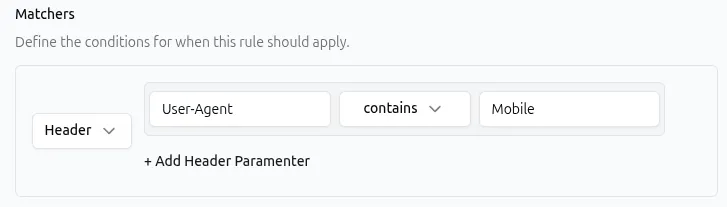
API representation:
{ "type": "header", "params": { "items": [ { "name": "User-Agent", "operator": "contains", "value": "Mobile" } ] }}Match Bearer token authentication
Section titled “Match Bearer token authentication”To match requests using Bearer token authentication:
Header: AuthorizationOperator: begins withValue: Bearer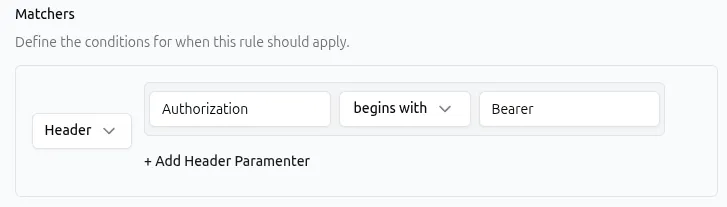
API representation:
{ "type": "header", "params": { "items": [ { "name": "Authorization", "operator": "begins_with", "value": "Bearer" } ] }}This matches any request where the Authorization header starts with Bearer, regardless of the token value that follows.
Match a specific content type
Section titled “Match a specific content type”To match requests with a JSON body:
Header: Content-TypeOperator: is equal toValue: application/json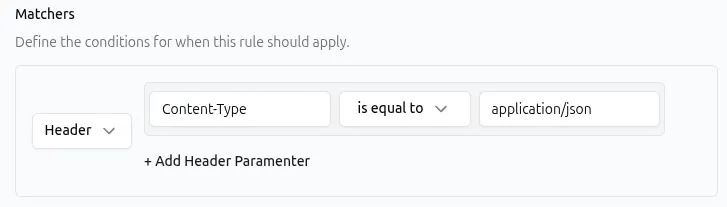
API representation:
{ "type": "header", "params": { "items": [ { "name": "Content-Type", "operator": "equal", "value": "application/json" } ] }}Exclude bot traffic
Section titled “Exclude bot traffic”To match requests that do not appear to come from bots:
Header: User-AgentOperator: does not containValue: bot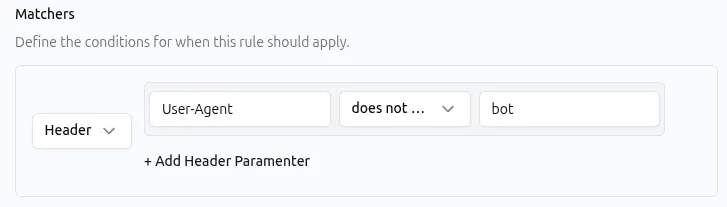
API representation:
{ "type": "header", "params": { "items": [ { "name": "User-Agent", "operator": "not_contains", "value": "bot" } ] }}Matching multiple headers in a single matcher
Section titled “Matching multiple headers in a single matcher”A single Header matcher can include conditions for more than one header.
When multiple header conditions are added to the same matcher, all of them must match before the rule executes.
For example, a single Header matcher with these conditions:
User-Agent contains MobileContent-Type is equal to application/jsonOnly matches requests that satisfy both conditions — a mobile client sending JSON.
This is different from adding two separate Header matchers to the same rule, which behaves identically. Use whichever approach keeps your rule configuration clearer.
Combining the Header matcher with other matchers
Section titled “Combining the Header matcher with other matchers”A rule can contain matchers of different types. When multiple matchers are configured, all of them must match before the rule executes.
| Matcher combination | What it matches |
|---|---|
Header Authorization: begins with Bearer + Path /api | Only requests to /api that include a Bearer token |
Header User-Agent: contains Mobile + Method GET | Only GET requests from mobile clients |
Header Content-Type: begins with application/ + Query format=raw | Only requests with an application content type and format=raw query parameter |
Similarly, you can combine the Header matcher with:
Common use cases
Section titled “Common use cases”The Header matcher is most effective when paired with a handler that takes a different action based on the headers in the request.
| Use case | Header matcher | Handler |
|---|---|---|
| Require Bearer authentication for API routes | Authorization: begins with Bearer | Static Response returning a 401 for requests without a Bearer token. See Static Response Handler. |
| Serve different content based on device type | User-Agent: contains Mobile | Redirect to a mobile-optimized URL. See Redirect Handler. |
| Add CORS headers for specific origins | Origin: begins with https://app.example | Response Headers to add Access-Control-Allow-* headers. See Response Headers Handler. |
| Route based on content type | Content-Type: begins with application/json | Request Headers to add a JSON-specific header before forwarding. See Request Headers Handler. |
| Block requests from a specific referrer | Referer: contains spam-domain.com | Static Response returning a 403 error. See Static Response Handler. |
| Forward client IP from proxy header | X-Forwarded-For: begins with 203.0. | Request Headers to pass the IP to the upstream in a different header. See Request Headers Handler. |
Best practices
Section titled “Best practices”- Header names are case-insensitive, but values may be case-sensitive depending on the header specification. The matcher performs case-sensitive value comparisons.
- Use
containsorbegins withfor User-Agent matching. User-Agent strings are long and vary across versions. Exact matching is fragile. - Use
begins withinstead ofis equal tofor Content-Type when the header may include parameters likecharset. - Do not rely on headers for security-critical decisions. Headers such as
User-Agent,Referer, andX-Forwarded-Forcan be set or modified by clients and intermediaries. - Be aware of proxy and CDN behavior. Proxies may add, modify, or remove headers before the request reaches Hostgrid.
- Use
unknownwhen the header should not affect matching. This is useful when the matcher is included for organizational clarity but the rule should run regardless of the header value.
Troubleshooting
Section titled “Troubleshooting”If a rule with a Header matcher is not matching as expected:
- Check header name spelling. Use the standard format with hyphens (e.g.,
User-Agent, notUserAgentoruser-agent). Names are matched case-insensitively. - Verify the actual header value. Use browser developer tools (Network tab) to inspect the exact value being sent. Values may include unexpected whitespace, charset parameters, or version strings.
- Review operator selection.
is not equal to application/jsonmatches every other content type includingtext/htmlandmultipart/form-data— not just “no content type.” - Check for proxy interference. If your traffic passes through a CDN or proxy, headers may be added, removed, or rewritten before reaching Hostgrid.
- Confirm matcher combinations. If the rule has multiple matchers, every one must evaluate to true. A Path matcher that does not match will prevent the rule from running even if the Header matcher does.
- Consider rule order. If an earlier rule contains a Redirect or Static Response handler, later rules will not execute for that request.
For more information about rule evaluation, see Hostgrid Rules.