
Request Headers Handler
The Request Headers handler allows a rule to add, modify, or remove HTTP headers in the incoming request before Hostgrid forwards it to the upstream.
This is useful for injecting authentication tokens, forwarding client information (like IP addresses), adding headers that your upstream application uses for routing decisions, or stripping headers that should not reach the upstream — all without modifying your application code.
To learn how handlers fit into rules, see Hostgrid Rules.
How the Request Headers handler works
Section titled “How the Request Headers handler works”When a rule containing a Request Headers handler matches a request, Hostgrid intercepts the request, applies your header operations, and then forwards the modified request to the upstream. The upstream sees only the modified headers.
Incoming Request │ ▼Rule Matches → Request Headers Handler Executes → Modifies Request Headers │ ▼Modified Request Forwarded to Upstream │ ▼Upstream Returns Response │ ▼Response Sent to ClientConfiguration options
Section titled “Configuration options”The Request Headers handler accepts an array of operations. Each operation defines a single action to perform on a request header.
| Option | Type | Required | Description |
|---|---|---|---|
action | string | Yes | The operation to perform. Must be set (add or modify) or delete (remove). |
name | string | Yes | The HTTP header name (e.g., Authorization, X-Forwarded-For). |
value | string | Conditional | The value to set. Required if action is set. Ignored if action is delete. |
Understanding set vs delete
Section titled “Understanding set vs delete”set: If the header does not exist in the incoming request, it is added. If the header already exists, its value is replaced by the new value.delete: Removes the header from the incoming request entirely. If the header does not exist, the operation does nothing.
Configuration examples
Section titled “Configuration examples”Add an authentication header
Section titled “Add an authentication header”To pass an API key or static token to your upstream application:
Action: setName: AuthorizationValue: Bearer sk_live_abc123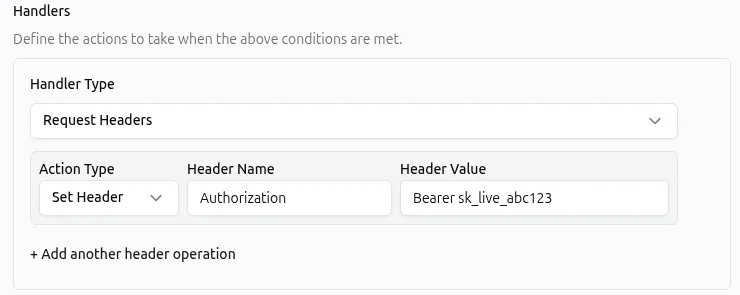
API representation:
{ "type": "request_headers", "params": { "operations": [ { "action": "set", "name": "Authorization", "value": "Bearer sk_live_abc123" } ] }}Remove a header before it reaches the upstream
Section titled “Remove a header before it reaches the upstream”To strip the Cookie header for requests to a specific path that should not carry session data:
Action: deleteName: Cookie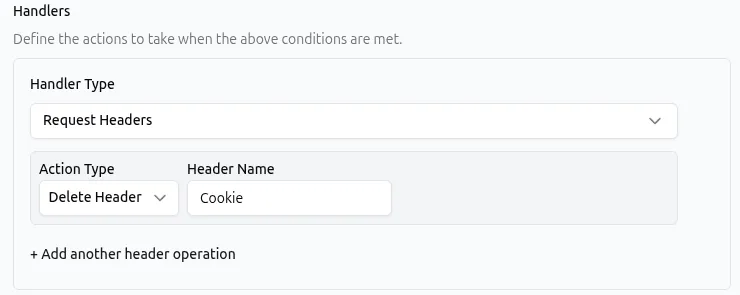
API representation:
{ "type": "request_headers", "params": { "operations": [ { "action": "delete", "name": "Cookie" } ] }}Perform multiple operations in one handler
Section titled “Perform multiple operations in one handler”A single Request Headers handler can contain multiple operations. They are executed in the order they appear.
For example, adding a custom routing header and removing an internal header simultaneously:
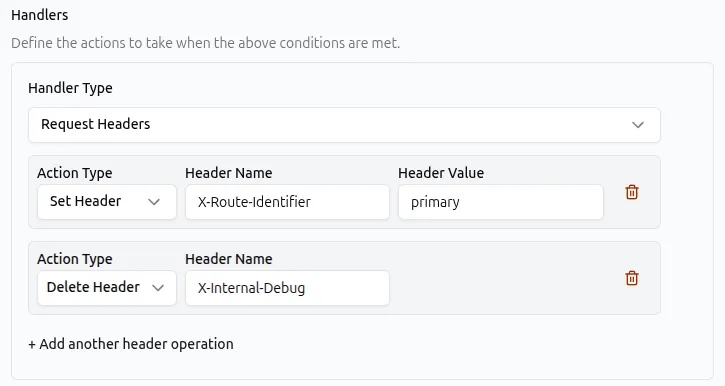
API representation:
{ "type": "request_headers", "params": { "operations": [ { "action": "set", "name": "X-Route-Identifier", "value": "primary" }, { "action": "delete", "name": "X-Internal-Debug" } ] }}Common use cases
Section titled “Common use cases”The Request Headers handler is typically applied globally via upstream rules or to specific routes via domain rules.
| Use case | Matcher example | Request Headers configuration |
|---|---|---|
| Pass authentication to the upstream | Match all requests | set Authorization to Bearer <token> |
| Forward a custom identifier for logging | Match all requests | set X-Domain-Id to a value identifying the domain |
| Strip cookies from API endpoints | Path begins with /api/ | delete Cookie |
Override the Host header for legacy upstreams | Path begins with /legacy/ | set Host to legacy.internal.example.com |
| Add a header for A/B testing routing | Header X-Experiment is equal to v2 | set X-Upstream-Variant to experiment-b |
| Remove client-facing headers that the upstream ignores | Match all requests | delete Accept-Language, delete Accept-Encoding |
Combining with other handlers
Section titled “Combining with other handlers”Because the Request Headers handler modifies the request on the way to the upstream, it pairs naturally with other handlers.
- Response Headers: You can use a Response Headers handler in the same rule to modify headers coming back from the upstream, while the Request Headers handler modifies headers going to it.
- Rewrite: When rewriting a request path, you might also need to add a header so the upstream knows the original URL. Place a Rewrite handler before the Request Headers handler if the header value depends on the rewritten path, or after if the header should reflect the original path.
- Static Response: If a rule also contains a Static Response handler, the Static Response handler returns a response directly without contacting the upstream. In this case, any Request Headers operations in the same rule will still execute but will have no practical effect, since the modified request is never forwarded. Place Request Headers handlers in rules that forward to the upstream.
Best practices
Section titled “Best practices”- Do not modify Hop-by-Hop headers. Headers like
Transfer-Encoding,Connection,Keep-Alive, andUpgrademanage the connection between Hostgrid and the client. Modifying or deleting these can break the request. - Use upstream rules for headers that apply to all domains. If a header (like an authentication token) should be sent regardless of which custom domain received the request, configure the rule on the upstream rather than duplicating it across individual domain rules.
- Use domain rules for per-domain differentiation. If your upstream needs to know which custom domain a request arrived on, add a domain rule that sets a header like
X-Forwarded-Hostor a custom identifier. - Group related operations. Instead of creating multiple rules to set three different headers, use a single Request Headers handler with three
setoperations. - Be cautious with sensitive values. Headers set via rules are visible to the upstream. Do not place secrets in request headers if the upstream is not a system you control.
Troubleshooting
Section titled “Troubleshooting”If a rule with a Request Headers handler is not behaving as expected:
- Check that the upstream reads the header. Hostgrid reliably forwards the modified headers, but your upstream application must be configured to read and act on them. Verify with server-side logging or a test endpoint that echoes request headers.
- Verify header name spelling. Use standard casing (e.g.,
Authorization, notauthorization). While HTTP headers are technically case-insensitive, using standard casing prevents confusion and matches common framework expectations. - Check for rule conflicts. If you have two rules setting the same header, the rule positioned later in the execution order will win. Review your rule ordering if a header value is not what you expect.
- Inspect the actual request arriving at the upstream. Use a service like
httpbin.org/headersas a temporary upstream, or add logging in your application, to confirm the headers Hostgrid is sending. - Avoid modifying
Content-Length. If you add or remove headers, Hostgrid manages the necessary framing. Manually settingContent-Lengthvia this handler can cause the upstream to misinterpret the request body. - Check for interactions with Static Response. If the same rule contains a Static Response handler, the request is never forwarded to the upstream. Request Headers in that rule will execute but have no effect on the upstream. Move the Request Headers to a separate rule if the upstream needs them.