
Hostgrid Rules
Rules allow you to customize how requests and responses are handled as traffic passes through Hostgrid.
A rule is made up of conditions that determine when it should run, and actions that define what should happen when those conditions are met.
Rules are evaluated for every incoming request, making them a flexible way to control routing, modify requests or responses, and implement custom behavior without changing your upstream application.
What are rules?
Section titled “What are rules?”You can think of a rule as an if–then statement:
If a request matches certain conditions, then perform one or more actions.
For example:
- If the request path begins with
/blog/, rewrite the request before forwarding it. - If the request contains a specific header, add additional request headers.
- If the request matches a maintenance path, return a static response without contacting the upstream.
Rules allow you to customize traffic handling without deploying changes to your application.
How rules work
Section titled “How rules work”Every rule consists of two parts:
- Matchers — define when a rule should run.
- Handlers — define what happens when the rule matches.
When a request reaches Hostgrid:
- The request arrives on the custom domain.
- Hostgrid evaluates rules in their configured order.
- Every matching rule is executed.
- Each matching rule runs its handlers in order.
- The request is forwarded to the upstream unless a handler returns a response directly.
Unlike traditional firewall-style rule systems, Hostgrid does not stop after the first matching rule.
Multiple rules can match the same request and all of them will execute sequentially.
Rule execution order
Section titled “Rule execution order”Rules are evaluated from top to bottom.
Rules positioned earlier in the list execute before rules below them.
For example:
1. Add Authentication Header2. Remove Authentication Header for Public API3. Add Response HeadersA request to:
/api/public/statuswould execute:
- Add Authentication Header
- Remove Authentication Header
- Add Response Headers
Because all matching rules execute, later rules can modify changes made by earlier rules.
Carefully consider rule ordering when multiple rules affect the same request.
Rule components
Section titled “Rule components”Matchers
Section titled “Matchers”Matchers determine whether a rule applies to an incoming request.
A rule can contain one or more matchers.
Supported matcher types include:
| Matcher | Description |
|---|---|
| Path | Match based on the request path. |
| Method | Match specific HTTP methods such as GET or POST. |
| Header | Match HTTP request headers. |
| Query | Match URL query parameters. |
Path, Header and Query matchers support comparison the following operators:
- is equal to
- is not equal to
- begins with
- ends with
- contains
- does not contain
- unknown (always match)
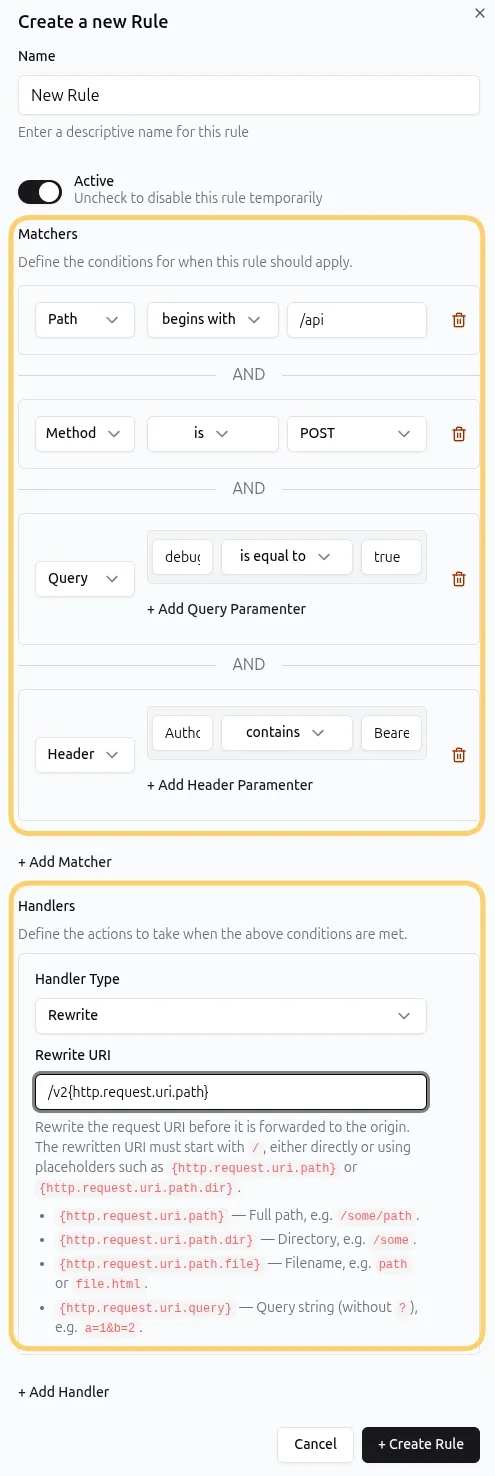
When multiple matchers are added to the same rule, they use AND logic.
Every matcher must evaluate to true before the rule executes.
For example:
Matcher 1
Path begins with /premium/Matcher 2
Header:Premium-User = trueOnly requests that satisfy both conditions will match the rule.
Below is an example of the a sample rule config in the UI:
Handlers
Section titled “Handlers”Handlers define the actions that occur when a rule matches. A single rule can contain multiple handlers.
Handlers execute in the order they are configured.
Available handlers include:
| Handler | Description |
|---|---|
| Static Response | Return a response without forwarding the request to the upstream. |
| Redirect | Return a temporary or permanent redirect to another URL. |
| Rewrite | Modify the request URL before forwarding it. |
| Request Headers | Add, modify, or remove headers sent to the upstream. |
| Response Headers | Add, modify, or remove headers before the response is sent to the visitor. |
For example, a rule could:
- Rewrite the request path.
- Add a request header.
- Add security headers to the response.
All three handlers execute in sequence.
Upstream rules and domain rules
Section titled “Upstream rules and domain rules”Rules can be configured at two different levels.
Upstream rules
Section titled “Upstream rules”Upstream rules belong to an upstream.
They apply to every domain connected to that upstream.
This is useful for behavior that should remain consistent across all customer domains.
Examples include:
- Adding security headers
- Authentication headers
- Global URL rewrites
Domain rules
Section titled “Domain rules”Domain rules belong to an individual custom domain.
They only affect requests for that specific domain.
Examples include:
- Customer-specific redirects
- Custom maintenance pages
- Domain-specific response headers
Execution order
Section titled “Execution order”If both upstream and domain rules exist, Hostgrid evaluates them in the following order:
Incoming Request │ ▼Upstream Rules │ ▼Domain Rules │ ▼Forward Request to UpstreamThis allows global behavior to be defined once while still supporting per-domain customization.
Creating a rule
Section titled “Creating a rule”Rules can be created from either an upstream or a domain.
- Open your Upstream or Domain.
- Select the Rules tab.
- Click Create Rule.
- Enter a descriptive name.
- Configure one or more matchers.
- Add one or more handlers.
- Save the rule.
New rules are added to the bottom of the list by default.
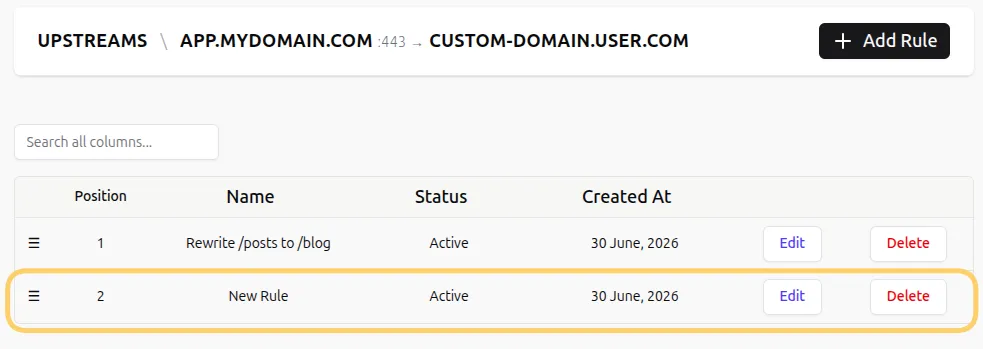
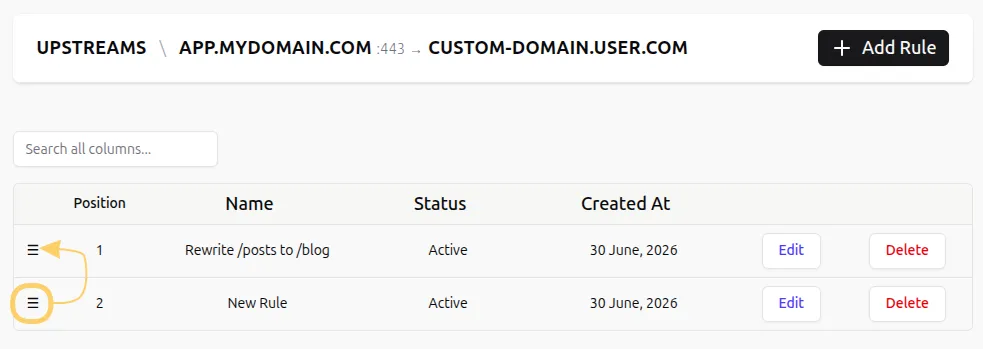
You can change execution order by dragging rules into a different position.
Earlier rules execute before later rules.
Common use cases
Section titled “Common use cases”Rules can be used for many common scenarios, including:
- Redirecting old URLs
- Serving custom maintenance pages
- Rewriting application routes
- Adding security headers
- Injecting request headers
- Modifying upstream responses
- Returning static content for specific routes
- Creating customer-specific routing behavior
Because rules are evaluated before requests reach your application, many routing and customization tasks can be implemented without changing application code.
Rule status
Section titled “Rule status”Each rule has an enabled or disabled state.
Disabled rules remain in your configuration but are skipped during request processing.
This makes it easy to temporarily disable behavior without deleting the rule.
Best practices
Section titled “Best practices”- Use descriptive rule names.
- Keep related rules together.
- Remember that multiple matching rules execute.
- Consider the cumulative effect of handlers.
- Place more specific rules before broader ones when ordering matters.
- Use the Static Response handler when a request should terminate immediately.
- Test changes after modifying rule order.